Ordering in a Restaurant
Most restaurants in mainland China use QR ordering: scan a code at the table, order and pay from WeChat. This guide covers what the built-in translation gets right, what it breaks, and how to handle both.
Last verified 16 October 2026. Checked against: Our own testing.
Ask for an English menu first
Ask 有英文菜单吗 (yǒu yīng wén cài dān ma) before you scan — you still order through the app either way.
Details
Not every restaurant has one, but enough do that it is worth asking every time. Higher-end restaurants and anywhere inside a major mall are most likely to have one. An English menu with photos is faster and more reliable than translating the mini app screen by screen.
If they do, you still order through the QR mini app. The paper menu is for reading, the phone is for ordering. Point at what you want on the paper menu and match it to the photo in the app.
Know when you pay
Order by QR: you usually pay as you order, to submit it. Order from the wait staff: you pay at the end.
Details
The rule of thumb: if you order with the QR code, you pay right away to submit the order. Payment is part of ordering, not something you do when you finish the meal. The order usually does not reach the kitchen until the payment goes through.
If you order from the wait staff directly, with no QR code, you pay at the end of the meal as you would at home.
There are occasional exceptions. Some restaurants let you submit a QR order without paying, and then you pay at the end. If the app does not ask you to pay, that is what is happening.
Scan the table QR code
WeChat → + → Scan (not Translate) → point at the table QR.
Details
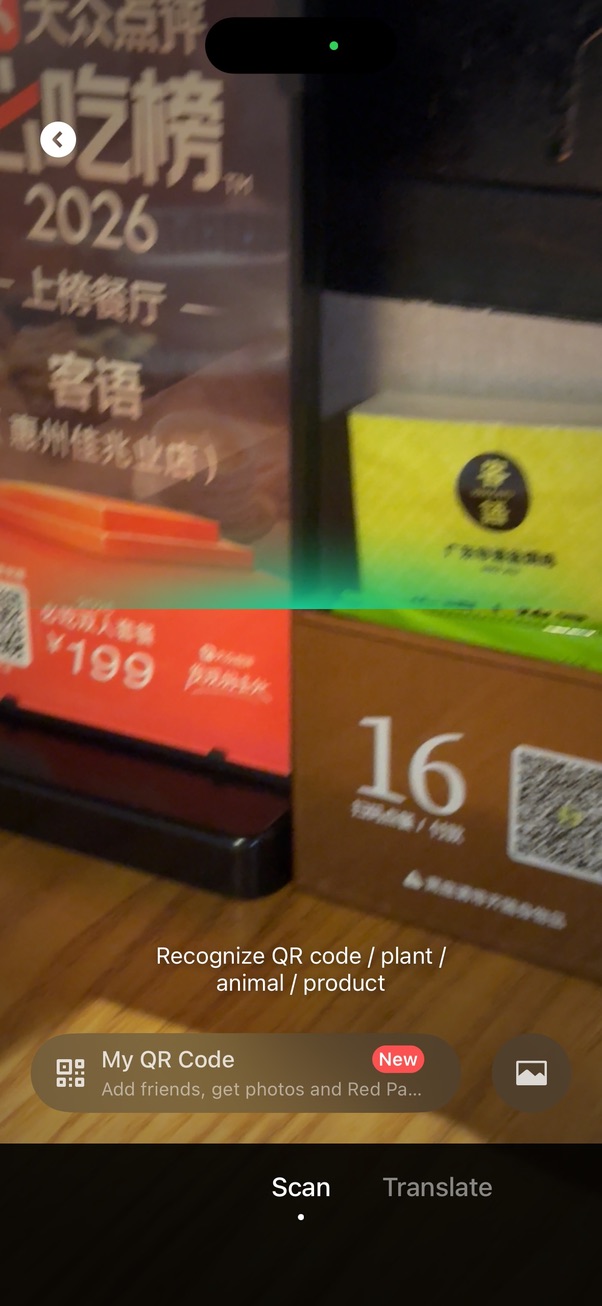
Open WeChat, tap the + icon top right, then Scan. Point at the QR code on your table — most tables have a standing card or sticker with the code and your table number.
Note the two tabs at the bottom of the scanner: Scan and Translate. You want Scan here — Translate is a separate tool for photographing printed text, useful for a paper menu but not for the table code. The menu opens as a WeChat mini program; nothing gets installed.
Land on the table page, tap to order
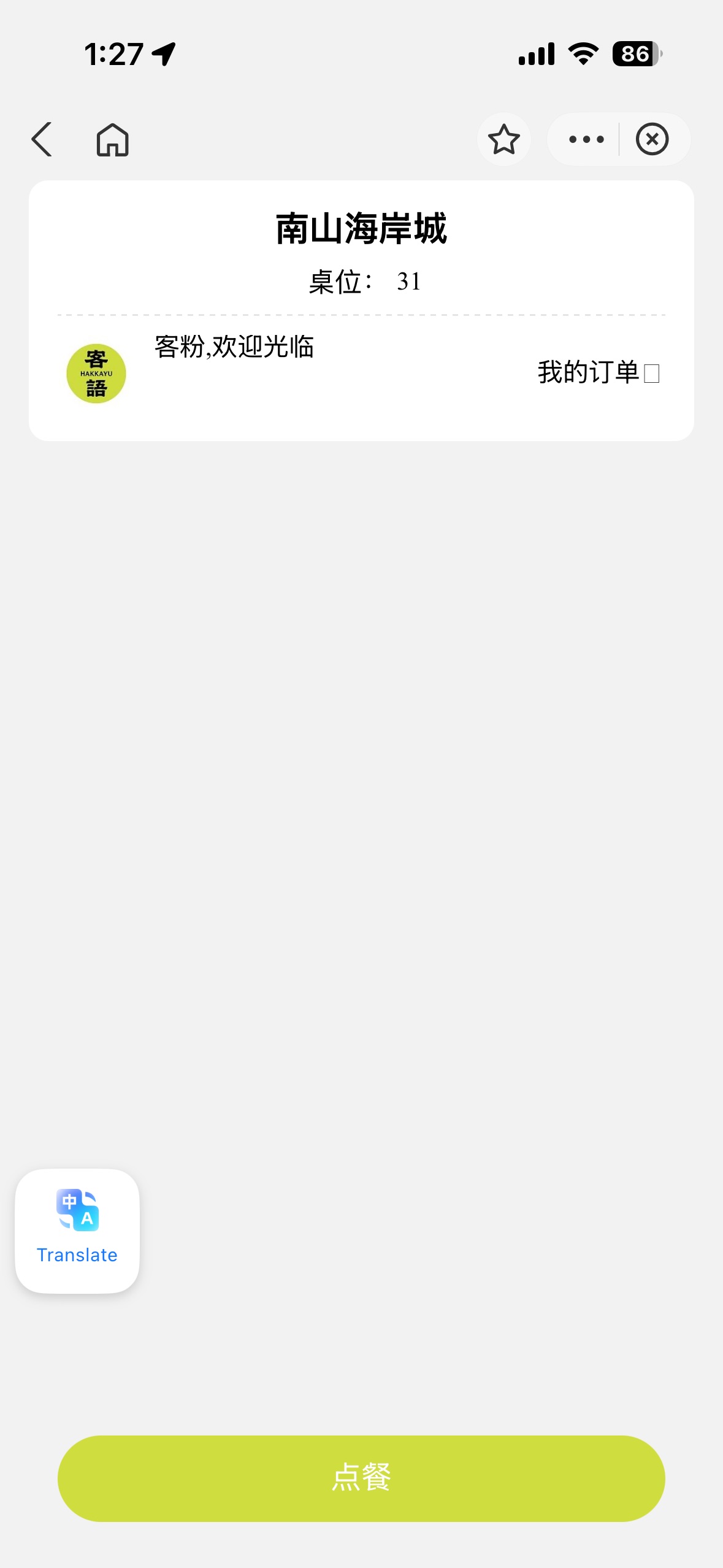
Tap 点餐 (diǎn cān, "order food") to continue.
Details
Scanning the table QR lands you on a page showing the restaurant name and your table number. Tap 点餐 (diǎn cān), "order food," to continue. If someone at your table already ordered, tap 如已下单请跳过 ("if already ordered, please skip") instead.
Confirm party size
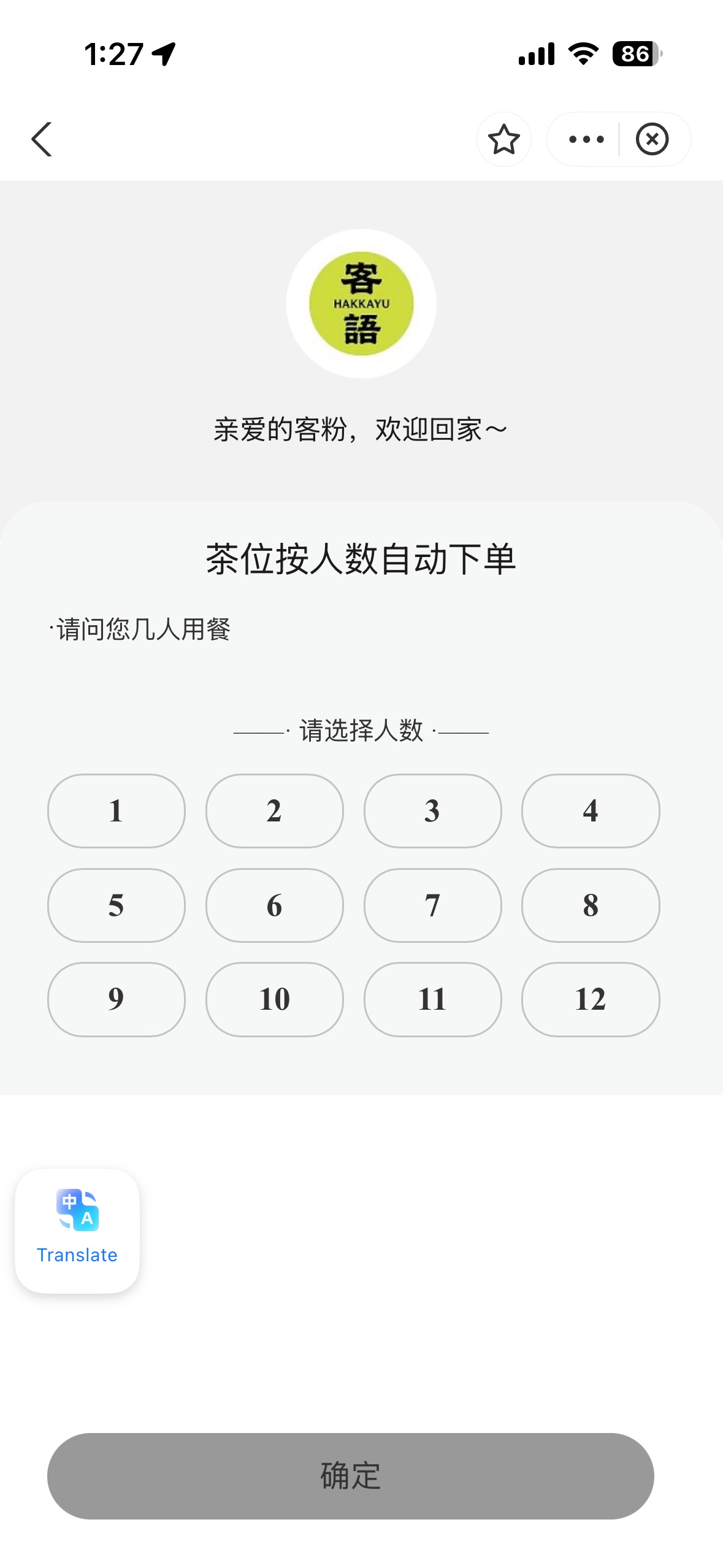
Tap your table’s headcount — per-person items adjust automatically.
Details
Many restaurants ask how many people are dining before showing the menu. This matters because some items are priced or served per person, tea and table charges especially. Tap the number that matches your table, then confirm. The full menu loads after this, with per-person items like tea seating (茶位) already reflecting your party size in the cart.
The menu loads in Chinese
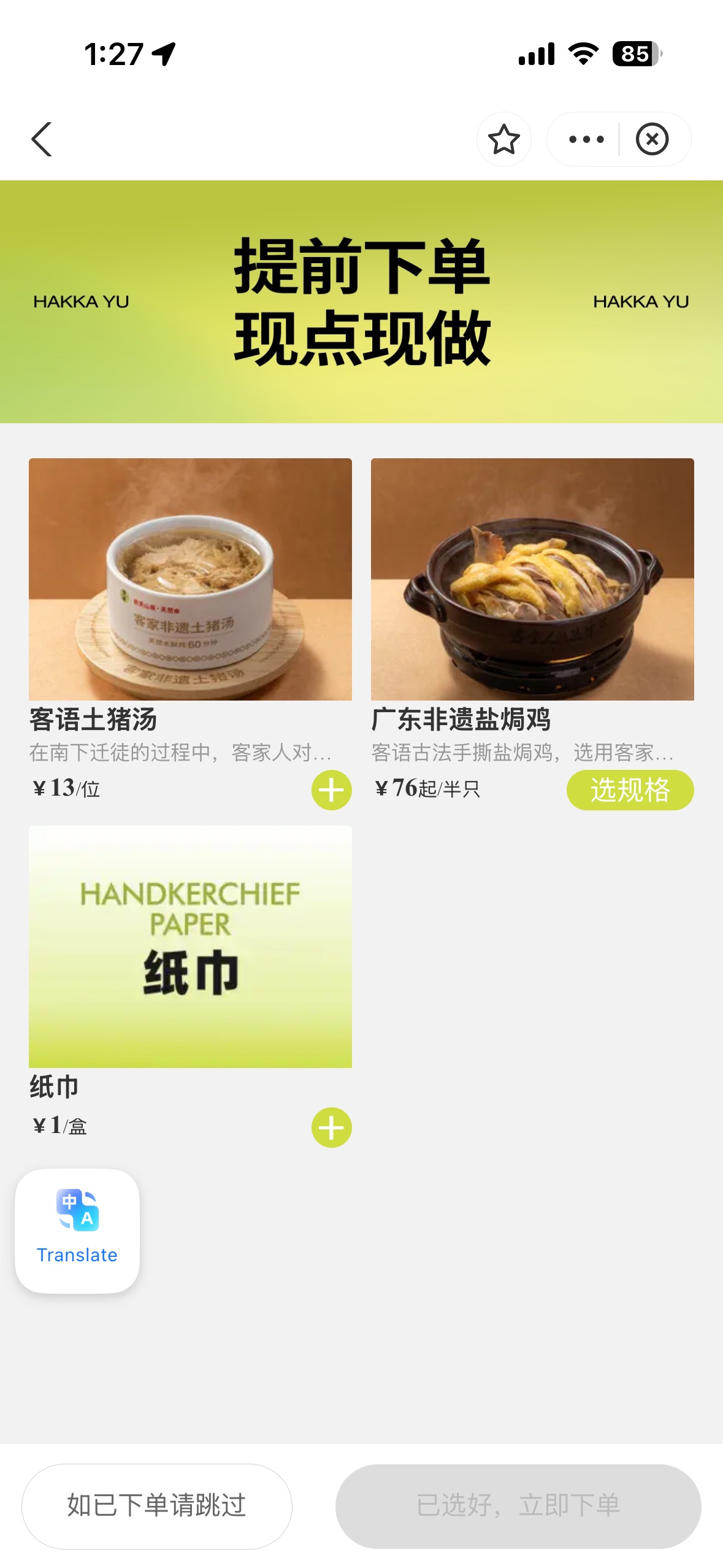
Photos and prices are readable even before translating.
Details
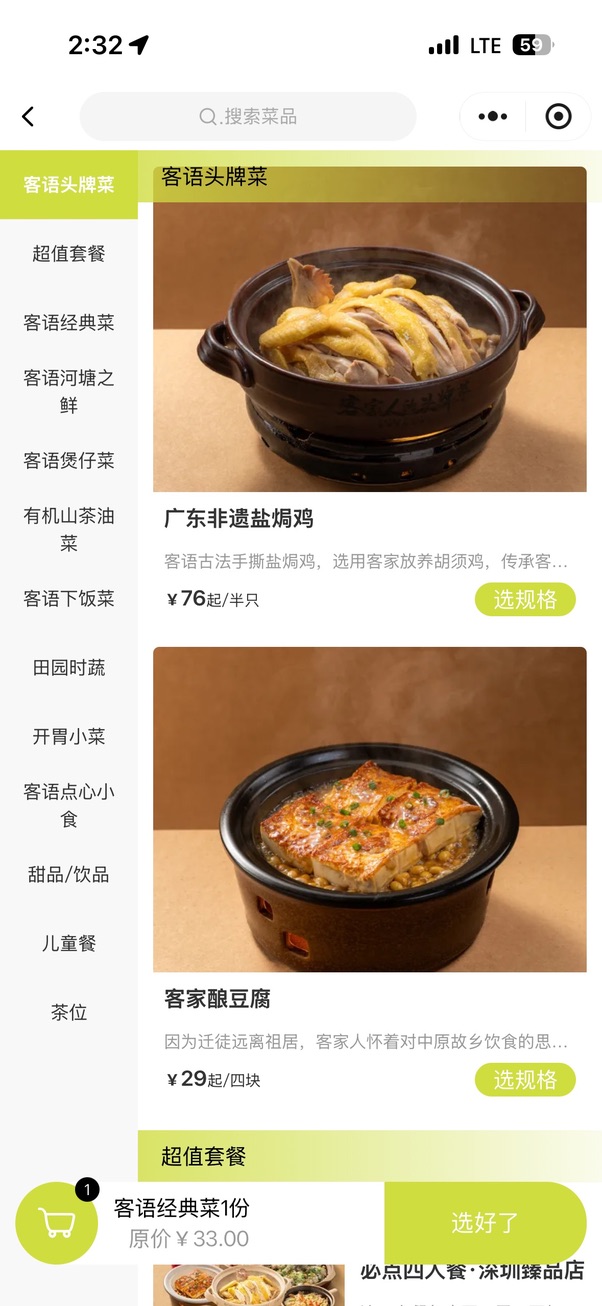
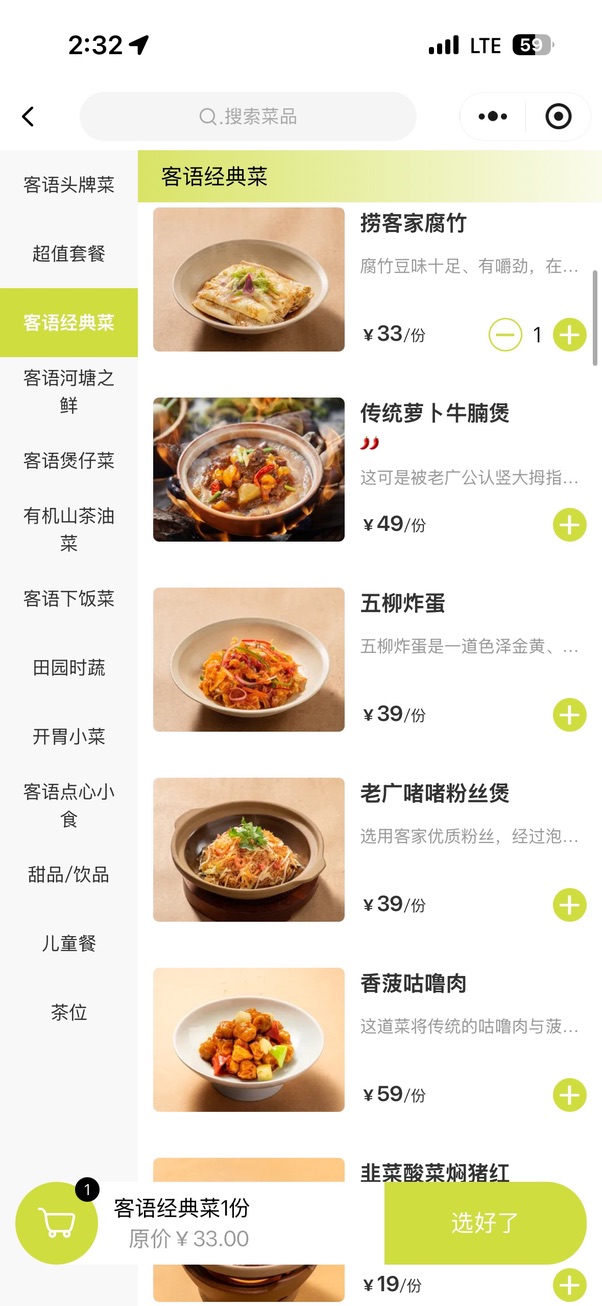
You will see a category list down the left side, dishes with photos/names/descriptions/prices on the right, a cart at the bottom with a running total, and your table number at the top. Photos are the important part — even untranslated, they tell you most of what you need.
¥76起/半只 breakdown: 起 = "from" (price starts here, options may cost more). 半只 = "half a bird" for poultry. 份 = "portion". 位 = "per person".
Turn on translation
Three dots (···) top right → Translate. The single most useful tap in this guide.
Details
Tap the three dots (···) at the top right of the mini app, then tap Translate. The page reloads in English. This is the single most useful thing in this guide and it is buried in a menu most people never open.
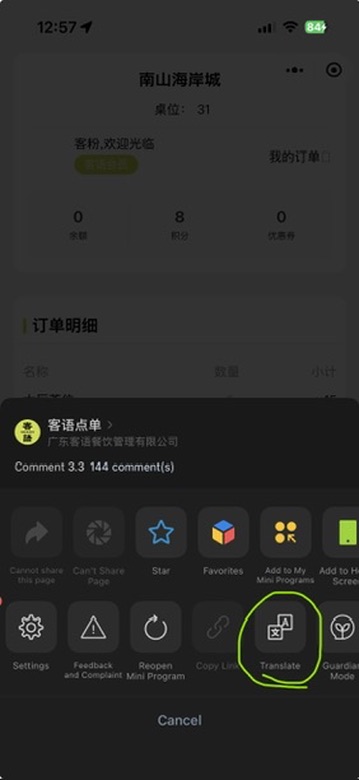
- 1Tap here — three dots, then Translate
Read the translated menu, knowing what it gets wrong
Category column breaks, dish names can read strangely — check the photo, not just the text.
Details
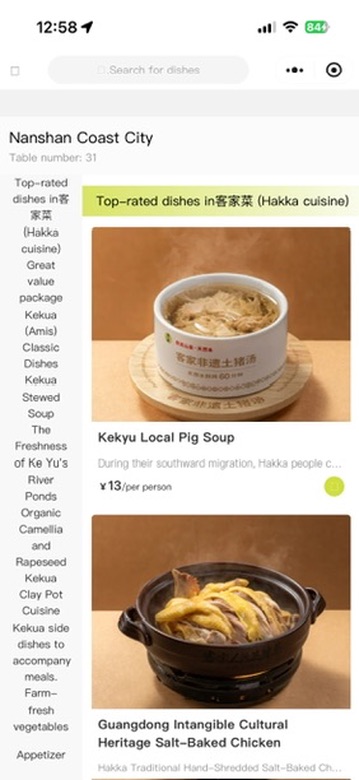
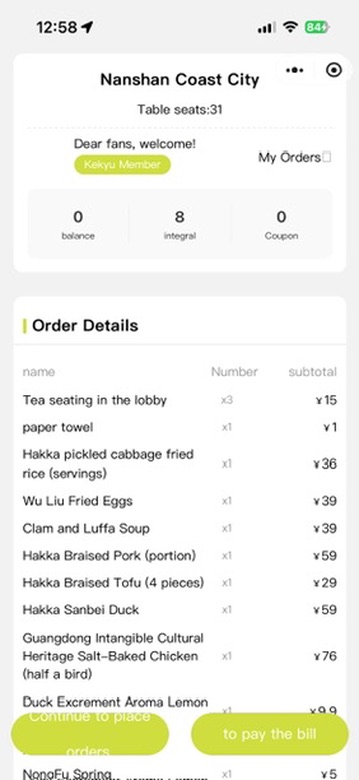
Translation works, but with three consistent problems. The left category column breaks: Chinese category names are short, English translations are long, and the column overlaps into a squashed strip — scroll the main panel instead of relying on categories.
Dish names translate literally, sometimes alarmingly — e.g. "Duck Excrement Aroma Lemon" for 鸭屎香柠檬, a well-known Phoenix Dancong tea variety. If a dish name reads bizarrely, check the photo before ruling it out. Some items stay in Chinese entirely: category headers, promotional banners, and certain dish names.
The order summary screen, by contrast, translates cleanly — check it before you submit.
Add dishes and handle options
Set meals are the weak spot — an unpicked option blocks the whole cart add.
Details
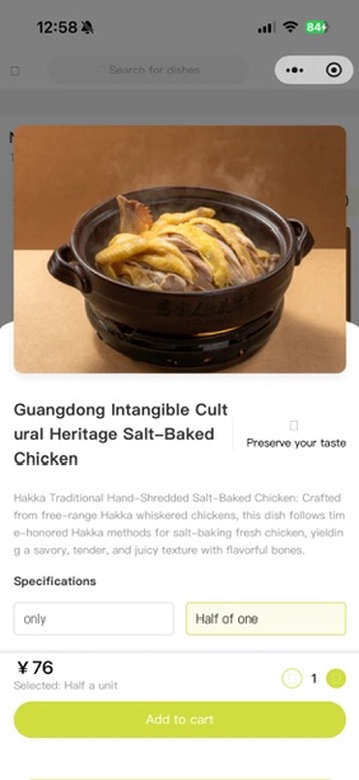
Tap a dish to open it. Simple dishes have a + button, tap once per portion. Dishes with options show a Specifications section before you can add them — portion size, spice level, cooking method. Select an option, then Add to cart.
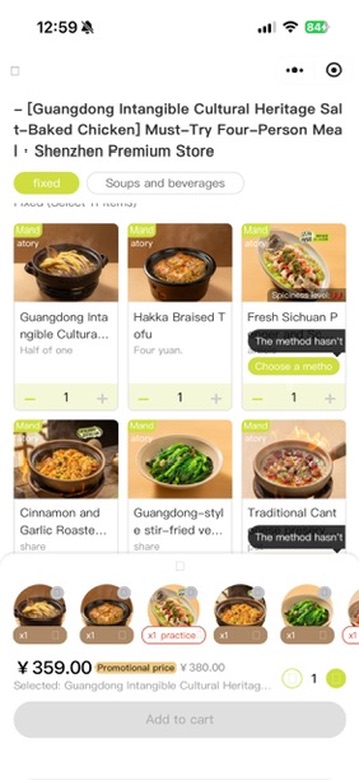
Set meals are where translation is weakest: a grid of included dishes, some marked "Mandatory," some needing a choice, with tooltips like "The method hasn't been selected" over items still needing input — those tooltips often stay untranslated. If a set meal will not let you add it to the cart, one of its items still needs a selection; look for the highlighted tooltip.
Review and submit
Check the cart and submit. In most restaurants you pay at this point and the order goes through once payment succeeds.
Details
Tap the cart, check the order summary, then submit. In most restaurants this is where you pay (see the Paying step). The order goes through once the payment succeeds.
Food arrives at your table number, with no further interaction needed.
Paying
QR order: pay in the app as you submit. Ask 收不收外国卡吗 (shōu bù shōu wài guó kǎ ma) first, since most restaurants don’t take foreign cards directly.
Details
With QR ordering you usually pay in the app as part of submitting the order, with WeChat Pay or Alipay. Do not wait until the end of the meal. The order is not sent until you pay. If you ordered from the wait staff instead, pay at the end, at the table or the counter.
Occasionally a QR order goes through without a payment step. In that case, pay at the counter when you leave and give your table number.
Most restaurants do not accept international credit cards. Exceptions are higher-end restaurants, particularly inside premium malls like MixC or One Avenue, but it varies restaurant to restaurant even within the same mall, so do not assume. If the answer is no, pay with WeChat Pay or Alipay linked to your international card, which works at registered merchants even where a physical foreign card does not. Cash is your final fallback.
Quick reference
| Arriving at the table | Ask 有英文菜单吗 before scanning |
| Menu is in Chinese | Three dots → Translate |
| Category column unreadable | Ignore it, scroll the main panel |
| Dish name sounds strange | Check the photo, translation is literal |
| Cannot add a set meal | An item inside still needs a selection |
| Paying by card | Ask 收不收外国卡吗 first |
| Card not accepted | WeChat Pay or Alipay, then cash |
| Ordering with the QR code | Pay right away to submit the order |
| Ordering from the wait staff | Pay at the end of the meal |
| QR order with no payment step | Rare. Pay at the counter when you leave |
Useful phrases
有英文菜单吗?
Do you have an English menu?
收不收外国卡吗?
Do you accept foreign cards?
Common questions
Do restaurants in China use QR codes to order?
Most restaurants in mainland China do. You scan the code on your table and the menu opens as a WeChat mini program, where you order and pay. Nothing gets installed.
Can I order without reading Chinese?
Yes. Tap the three dots at the top right of the mini app, then Translate, and the menu reloads in English. The translation is not perfect: dish names can read literally and some items stay in Chinese, so check the photo before you rule a dish out.
Do I pay through WeChat?
With QR ordering you usually pay in the app as you submit the order, with WeChat Pay or Alipay, and the order is not sent until you pay. If you order from the wait staff instead, you pay at the end of the meal.
Do restaurants in China accept foreign credit cards?
Most do not. Some higher-end restaurants do, but it varies even within the same mall. Ask first, and if the answer is no, pay with WeChat Pay or Alipay linked to your international card.
Related guides
- NextSetting Up Alipay and WeChat PayAlipay and WeChat Pay are how you pay for almost everything in mainland China. Neither needs a Chinese bank account or SIM, but both need setup before you fly — do this now, not mid-trip.
- NextTaking the High-Speed Train (HSR)China's high-speed rail is fast and punctual. What catches foreigners out is the station process: two security checks, passport-based ticketing, and boarding that can close before the printed departure time.
- NextSetting Up the Metro QR CodeChinese metro systems run on QR codes, not tickets or cards. Activate a transit QR inside WeChat, then hold your phone to the gantry scanner to enter and exit — fares charge automatically.
Get the Dao companion when it launches in Shenzhen
Send this guide to your travel partner